Showing posts with label java. Show all posts

Friday, December 19, 2014

Presentation: Java & JavaScript - Best Friends?

Jjs

Last week I was invited again to give a talk at the annual developer day of Swiss Railways (SBB).

As every year the conference was a great event with many great sessions and interesting discussions during the breaks.

My talk was about how JavaScript can fit into a Java ecosystem.

Friday, March 21, 2014

Running Node.js applications on the JVM with Nashorn and Java 8

Jjs
I am naively playing around with Nashorn. Nashorn is the new JavaScript Runtime that comes with Java 8 and runs on the JVM.

In this post I show how to run simple Node.js applications with Nashorn on the JVM.

Avatar.js is a project to bring the node programming model, APIs and module ecosystem to the Java platform. Unfortunately Avatar.js does not officially provide a binary distribution and the build process looks quite intricate (involving Python and C++).

There is also Project Avatar, an upcoming web-platform by Oracle. Project Avatar builds upon Avatar.js.

By reverse-engineering Project Avatar I found the necessary artefacts of Avatar.js in the java.net Maven repository. These artefacts can be used to run Node applications with Avatar.js without having to build Avatar.js yourself.

The following steps show how to run a simple Node.js web application on OSX. The steps should be very similar for Linux or Windows.
  1. Download avatar-js.jar from the java.net Maven Repo.
    Current version is here: https://maven.java.net/content/repositories/public/com/oracle/avatar-js/0.10.25-SNAPSHOT/
    Example file: avatar-js-0.10.25-20140313.063039-43.jar 

  2. Download the native library avatar-js.dylib from the java.net Maven Repo.
    Current version is here: https://maven.java.net/content/repositories/public/com/oracle/libavatar-js-macosx-x64/0.10.25-SNAPSHOT/
    Example file: libavatar-js-macosx-x64-0.10.25-20140312.062209-35.dylib
    For Linux you would download the corresponding .so file from ../libavatar-js-linux-x64/0.10.25-SNAPSHOT/
    For Windows you would download the corresponding .dll file from ../libavatar-js-win-x64/0.10.25-SNAPSHOT/

  3. Rename the native library to avatar-js.dylib and rename the jar to avatar-js.jar and put both in a directory called dist

  4. Create a simple Node.js app in the a file called app.js:


  5. Run the command:
    java -Djava.library.path=dist -jar dist/avatar-js.jar app.js
  6. The output should be:
    Server running at http://127.0.0.1:8000/

  7. Navigate to http://localhost:8000/

Wednesday, March 19, 2014

Performance: Nashorn vs. Node

250x250xJavaScript logo png pagespeed ic I5rUk2FRl9

I am naively playing around with Nashorn. Nashorn is the new JavaScript Runtime that comes with Java 8 and runs on the JVM.

I am using the current Build b132 of the Early Access Release of Java 8 on a recent MacBook Pro (2.3 GHz Intel Core i7)

One of my first experiments is comparing performance with node.js.

I have run the following script with Nashorn and with Node:

The results:

Nashorn:
✔ jjs fib.js
Input: 30, Time: 66
Input: 31, Time: 40
Input: 32, Time: 58
Input: 33, Time: 90
Input: 34, Time: 154
Input: 35, Time: 242
Input: 36, Time: 348
Input: 37, Time: 556
Input: 38, Time: 920
Input: 39, Time: 1483
Input: 40, Time: 2426
Input: 41, Time: 3928
Input: 42, Time: 6360
Input: 43, Time: 10303
Input: 44, Time: 16602
Input: 45, Time: 26802
Input: 46, Time: 43384
Input: 47, Time: 72201
Input: 48, Time: 116425
Input: 49, Time: 188520
Node:
✔ node fib.js
Input: 30, Time: 13
Input: 31, Time: 20
Input: 32, Time: 33
Input: 33, Time: 53
Input: 34, Time: 88
Input: 35, Time: 142
Input: 36, Time: 226
Input: 37, Time: 365
Input: 38, Time: 590
Input: 39, Time: 954
Input: 40, Time: 1530
Input: 41, Time: 2522
Input: 42, Time: 4047
Input: 43, Time: 6534
Input: 44, Time: 10557
Input: 45, Time: 17161
Input: 46, Time: 27712
Input: 47, Time: 46323
Input: 48, Time: 73521
Input: 49, Time: 118905
Pure Java:
✔ java -cp fibdemo.jar FibDemo
Input: 30, Time: 5
Input: 31, Time: 6
Input: 32, Time: 11
Input: 33, Time: 18
Input: 34, Time: 27
Input: 35, Time: 45
Input: 36, Time: 71
Input: 37, Time: 121
Input: 38, Time: 188
Input: 39, Time: 304
Input: 40, Time: 490
Input: 41, Time: 804
Input: 42, Time: 1276
Input: 43, Time: 2067
Input: 44, Time: 3361
Input: 45, Time: 5445
Input: 46, Time: 8901
Input: 47, Time: 14253
Input: 48, Time: 23288
Input: 49, Time: 37160

Out of the box the performance of Node seems to be almost a factor 1.6 better than of Nashorn.

Of course this naive experiment is not representative for real world performance and this is still an early access release of Java 8. It might well be that the performance of the final release will be better. Also the JVM can probably be tuned in many ways unknown to me.

Still I would be interested in thoughts about the findings of this experiment...

Tuesday, October 22, 2013

Bookreview: Instant Vert.x

2913OS Last Year at the SBB Developer Day I was presenting a talk about Vert.x: asynchronous event-driven web-applications on the JVM.

Vert.x is a very interesting project that brings some fresh concepts to the JVM platform. At first glance Vert.x looks like a Node.js clone for the JVM. But there are differences: Vert.x can not (yet) offer the gigantic ecosystem of modules of Node.js, but it is certainly attractive for bringing a "Node.js-like" programming model to the proven and scalable JVM platform. With its distributed event bus and the concept of "worker verticles" Vert.x offers concepts that go beyond Node.js.

Packt Publishing sent me the Book "Instant Vert.x" for review.

Instant Vert.x is a short book (54 pages). As the name suggests, you can read it in "an instant" and it gets you bootstrapped into the world of Vert.x.

I liked the style of the book: it is short and concise and after reading it, you have a good overview over Vert.x as an application platform and the programming model that comes along with Vert.x.

However I have to note that the Vert.x project has a very nice online documentation. In my opinion the book goes not beyond the information that is also available online.

The advantage of the book is, that it structures the information in an easily digestible way that you can read in chunks offline. However I would have hoped for more "in-depth" information or some "best practices" how to use Vert.x in real projects.

If you have never heard of Vert.x, I can fully recommend "Instant Vert.x". If you have already played with Vert.x the book is probably not for you.

Wednesday, August 21, 2013

JBoss Remote EJB Invocation: An Unexpected Journey

Complexity sign6

The amount of complexity I'm willing to tolerate is proportional to the size of the problem being solved. There will come a point where the accumulated complexity of our existing systems is greater than the complexity of creating a new one.

- Ryan Dahl on Software

Es könnte alles so einfach sein, ist es aber nicht.

- Die Fantastischen Vier


Getting EJB Remoting to work in JBoss 7 was probably the most pitfall-ridden path I have travelled so far on my journeys through the swamp of frameworks…

Note: The example and discussion in this post is based on JBoss EAP 6.1.

It all started out well with a simple quick-start: ejb-remote.

But the pitfalls lured …

TL;DR: Finally I got an illustrative example running, which will be the base for the following discussion. The example can be found on my Github repo.

The EJB is simple: [Gist]

It's in the client where we find the pitfalls: [Gist]


Let's discuss the pitfalls:

Pitfall 1: Determining the JNDI-name for the EJB lookup

When you deploy the EJB into JBoss you get a nice output in the server-log:

[0m23:18:42,226 INFO  [org.jboss.as.ejb3.deployment.processors.EjbJndiBindingsDeploymentUnitProcessor] (MSC service thread 1-12) JNDI bindings for session bean named HelloWorldBean in deployment unit subdeployment "ejbremote-ejb.jar" of deployment "ejbremote-ear.ear" are as follows:
 
	java:global/ejbremote-ear/ejbremote-ejb/HelloWorldBean!net.jonasbandi.ejbremote.server.HelloWorld
	java:app/ejbremote-ejb/HelloWorldBean!net.jonasbandi.ejbremote.server.HelloWorld
	java:module/HelloWorldBean!net.jonasbandi.ejbremote.server.HelloWorld
	java:jboss/exported/ejbremote-ear/ejbremote-ejb/HelloWorldBean!net.jonasbandi.ejbremote.server.HelloWorld
	java:global/ejbremote-ear/ejbremote-ejb/HelloWorldBean
	java:app/ejbremote-ejb/HelloWorldBean
	java:module/HelloWorldBean

It looks easy … but actually none of those JNDI bindings work for remote lookup!


Pitfall 2: There are two approaches for accessing a remote EJB

You can use the "standard" JNDI lookup (which uses the "remote-naming project") or the the (proprietary) EJB Client API. Both approaches differ in the initialisation properties (key-value pairs) that have to be configured and in the JNDI lookup name that must be used for a given bean.

The EJB Client API is recommended. Loadbalancing, clustering and client interceptors are only available with the EJB Client API. Also it is performance optimised. [see here]

Pitfall 3: The initialisation properties are cryptic

I do not understand the following properties (except that they all have something to do with client, context and naming):

jndiProperties.put("jboss.naming.client.ejb.context", true);
ejbProperties.put(Context.URL_PKG_PREFIXES, "org.jboss.ejb.client.naming");
ejbProperties.put("org.jboss.ejb.client.scoped.context", "true");

Yet you have to use the correct ones for the correct lookup approach, else it won't work…
There are also a lot of other properties floating around in different documentations, wikis, forums and JIRA issues … I did not find a authoritative documentation about them.

Pitfall 4: Use the correct runtime dependencies

Runtime dependencies are tricky. You can get you code compiling, but it will not work unless you have the correct runtime dependencies configure. Getting the EJB client API running, you need:

      <dependency>
           <groupId>org.jboss</groupId>
           <artifactId>jboss-ejb-client</artifactId>
           <scope>runtime</scope>
       </dependency>

Getting the "standard" JNDI lookup running (including JNDI tree traversal) you need:

       <dependency>
            <groupId>org.jboss</groupId>
            <artifactId>jboss-remote-naming</artifactId>
            <scope>runtime</scope>
        </dependency>

In both cases you need some more runtime dependencies which are listed in the client pom.xml of the example.


Pitfall 5: Error messages are mostly not helpful or even misleading

Example 1: If you configure the wrong version of the ejb-client dependency like:

       <dependency>
           <groupId>org.jboss</groupId>
           <artifactId>jboss-ejb-client</artifactId>
           <scope>runtime</scope>
           <version>1.0.5.Final</version>
       </dependency>

Then you get an exception that makes you beleave you have made a mistake somewhere in the security-configuration:

javax.ejb.EJBAccessException: JBAS014502: Invocation on method: [] is not allowed


Example 2: If you pass a number instead of a string for the port configuration like this:

ejbProperties.put("remote.connection.1.port", 4447);

Then you get the same exception as when you use a wrong JNDI lookup name:

java.lang.IllegalStateException: EJBCLIENT000025: No EJB receiver available for handling [appName:ejbremote-ear, moduleName:ejbremote-ejb, distinctName:]


Pitfall 6: Client interceptor registration does not work with scoped context

Since JBoss 7.2 you can use scoped contexts and then you would not need do programmatic initialisation of the EJBClientContext.
So if you do this:

ejbProperties.put("org.jboss.ejb.client.scoped.context", "true");

… then you do not need to do the following:

final EJBClientConfiguration ejbClientConfiguration = new PropertiesBasedEJBClientConfiguration(ejbProperties);
final ConfigBasedEJBClientContextSelector selector = new ConfigBasedEJBClientContextSelector(ejbClientConfiguration);
EJBClientContext.setSelector(selector);

However if you do the above, then the programmatic registration of a client interceptor does not work any more. I suspect this is a bug?

In a later post I plan to elaborate on how to get the above example running with a custom login module and with a cluster setup… be prepared for more complexity and more magic strings!

Friday, December 14, 2012

Presentation: vert.x - asynchronous event-driven web-applications on the JVM

This week I was invented again to speak at the SBB Developer Day 2012.

My presentation was about vert.x:


SBB2012

I enjoyed the event very much, and I hope to be invited again next time.

Thursday, September 13, 2012

Tidbit: Hibernate bashing deluxe

This short speech from JavaZone 2011 is just ingenious! It really made me laugh out lout again and again.
I can fully recommend to watch the video (it's only 9 min), you will be amused, even if you don't know much about hibernate...


Hibernate should be to programmers what cake mixes are to bakers: beneath their dignity. from JavaZone on Vimeo.

Favorite quotes:

Frameworks like Hibernate leave you with pretty much exactly the same amount of work you had to do anyway, only now you are not enjoying it at all.
I present to you: Hibernate - the naked emperor's hairy butt-cheeks!
If Hibernate was a part of your team, you wouldn't even let him anywhere near your database.
We used to write algorithms, now we are writing annotations. Are we meant to be happy about that?

Monday, September 10, 2012

QuickTip: Programmatic MBean access under JBoss

I have been struggeling a bit with the programmatic access of MBeans under JBoss. This is my current conclusion.
With JBoss 5 there are two methods for accessing MBeans:
  • By JNDI-lookup of the RMIAdaptor. With this method you need the JBoss client libraries (the jars in your $JBOSS_HOME/client) on the classpath since the RMIAdaptor is a type that is provided by JBoss.
  • By pure JMX. You don't need the JBoss client libraries your class path here. 

The following snipped shows both methods:

With JBoss 7 the way to access MBeans changed quite a bit: The tricky thing here is, that you need the JBoss client libraries (the jars in $JBOSS_HOME/bin/client) on your classpath even though you don't explicitly import types provided by JBoss.

If the client libraries are missing, you get the following exception: java.net.MalformedURLException: Unsupported protocol: remoting-jmx

As far as I could figure, this is the only way to access MBeans under JBoss 7.

Friday, December 2, 2011

Opinions: Scala

Can you spot the difference:

Scala is a serious option for organizations developing on a JVM platform.


The friction and complexity that comes with using Scala instead of Java isn't offset by enough productivity benefit or reduction of maintenance burden for it to make sense as our default language.


Wednesday, November 3, 2010

Oracle vs. Google reminds me of Matrix Revolutions

Oracle.jpg Ha ha ha ...

All that talk, predicions, more talk and conspiracy theories around the Oracle vs. Google lawsuit and it's meaning for Java reminds me somehow of the time right after Matrix Revolutions when everybody was speculating about the plot of the third movie Matrix Reloaded. (Why can Neo control the sentinels in the real world, why can Smith take the body of a real human, what did the architect really mean ...)

There were actually people that spun up plots for Reloaded that were much better* than what finally turned out to be the disappointing end of the trilogy. I guess the same is true for the current wild theories where Java is heading ...

... somehow I suspect that the same that happened to Matrix Revolutions will happen to all the fuzz and expectations about where Java is heading: A year from now nothing will have changed substantially (Revolutions was not worthy to be connected to the first Matrix movie) and nobody will talk about it any more.

Much ado about nothing!

*search for neo2083

Wednesday, April 28, 2010

Eclipse on OSX Quick-Tip: Access Restriction Error

I have repeatedly come across this problem with Maven, Eclipse and e2eclipse on OSX:

After importing the Maven project into eclipse, I am getting a lot of the following errors:
Access restriction: The type Resource is not accessible due to restriction on required library /System/Library/Frameworks/JavaVM.framework/Versions/1.6.0/Classes/classes.jar

Screen shot 2010-04-10 at 11.58.18 PM.png


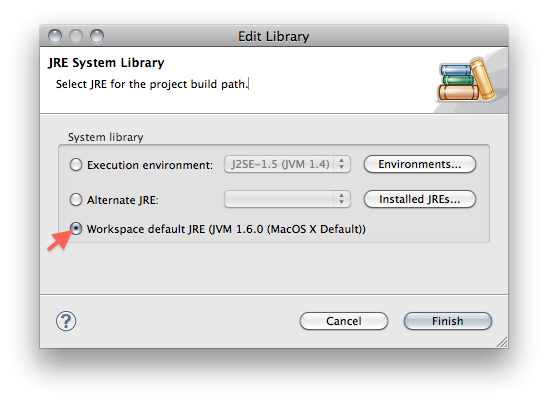
The solution is the following:
  1. Go to Project->Properties->Java Build Path
  2. Select the JRE System Library -> click Edit
  3. Select Workspace default JRE:
Screen shot 2010-04-10 at 11.59.42 PM.png

Tuesday, February 2, 2010

How to debug your code with cuke4duke

cucumber.jpg Cuke4duke is a ATDD/BDD tool for the JVM. The tool is based on Cucumber and uses JRuby to execute.

Out of the box cuke4duke offers three main ways to execute: Ant, Maven or cuke4duke-commandline.

But all of those three approaches are a bit tricky if you want to debug your application when executing in a BDD scenario.

There is some information on the wiki how to achieve it.

Here some more details:


Maven and Remote Debugging

When using Maven, you can add the following lines to your cuke4duke config in your pom.xml:
<plugin>
  <groupId>cuke4duke</groupId>
  <artifactId>cuke4duke-maven-plugin</artifactId>
  <configuration>
    <jvmArgs>
      <jvmArg>-Dcuke4duke.objectFactory=cuke4duke.internal.jvmclass.PicoFactory</jvmArg>
      <jvmArg>-Xdebug</jvmArg>
      <jvmArg>-Xnoagent</jvmArg>
      <jvmArg>-Djava.compiler=NONE</jvmArg>
      <jvmArg>-Xrunjdwp:transport=dt_socket,address=4000,server=y,suspend=y</jvmArg>
    </jvmArgs>

(a running example is here)

When you now run the integration-test phase (ie. mvn verify), then Maven breaks and waits for a debugger to connect:
[INFO] [cuke4duke:cucumber {execution: run-features}]
[INFO] Listening for transport dt_socket at address: 4000

Now you can connect with Eclipse with a new debug configuration (Run->Debug Configurations...). Choose 'Remote Java Application' and configure the same port as you configured in the pom.xml under address:
Screen shot 2010-01-10 at 4.06.36 PM.png
Now execute this debug configuration, and Maven (which is still waiting) will continue after Eclipse successfully connected, and any breakpoints you set in Eclipse will trigger.


Running from the IDE

Another way is to execute the whole enchilada (JRuby, cuke4nuke, cucumber…) directly out of the IDE. In Eclipse this is accomplished with a new Debug Configuration. Choose Java Application then configure it accordingly: Main class: org.jruby.Main
Screen shot 2010-01-10 at 4.13.57 PM.png
Program Arguments:
${M2_HOME}/repository/.jruby/bin/cuke4duke ./target/test-classes features


VM Arguments:
-Dcuke4duke.objectFactory=cuke4duke.internal.jvmclass.PicoFactory
Screen shot 2010-01-10 at 4.15.02 PM.png
Classpath: Make sure all needed jars are on the classpath.
Screen shot 2010-01-10 at 4.15.17 PM.png
Now execute this debug configuration and Eclipse will break directly at any breakpoint you set in your sources.

Wednesday, January 27, 2010

Lessons Learned from Java EE

Lessons Learned from Java EE is an interesting presentation by Rod Johnson.

Here the most interesting/provoking points:
  • The fallacy of love for complexity: "No pain no gain" does not apply for software. Powerful solutions do not have to be complex, the opposite is true!

  • Tools cannot conceal excessive complexity!

  • The myth of the code monkey: Developers are dumb. They have to be protected from having to make decisions. -> The result is excessive complexity.

  • The need for an over-arching (enterprise) strategy means that common sense is thrown out the window.

  • Complexity is an expensive luxury - in economic boom times people are happy spending money for complexity but economic downturns tend to reduce complexity.

  • Developer empowerment is an ongoing trend:
    • Because things change quicker than in the past, and management need to rely on developers more
    • Open source allows participation
    • Expensive, complex portfolio solutions/tools did not prove to be successful/productive
    • Agile development is a developer-led initiative
    • The Cloud is shifting the balance between operation and development

My posts around these topics:


Tuesday, December 29, 2009

Java vs. Net: Web Frameworks

Quantity is the real difference:
Screen shot 2009-12-29 at 7.06.16 PM.png

Humorous episodes following from this:
Trolling with Java Web Frameworks.
I don't think you can count someone even as a semi-decent java dev until he wrote his very own web framework at least once in his life (from here)

Thursday, December 24, 2009

Definition of Behavior Driven Development

images.jpg I updated the entry for Behavior Driven Development on Wikipedia.

On the Agile Testing, Specifications and BDD exchange Dan North gave an updated definition of BDD in his talk:

BDD is a second-generation, outside-in, pull- based, multiple-stakeholder, multiple-scale, high-automation, agile methodology. It describes a cycle of interactions with well- defined outputs, resulting in the delivery of working, tested software that matters.
Watch his talk for an explanation of this definition...

Wednesday, December 23, 2009

Maven gets partially absorbed by modern JVM languages …

matroschka250pxMaven has a lot of interesting and useful ideas, but its usage is often over-complicated and several concepts are too much entangled. (examples: 1, 2, 3)

The foremost feature of Maven that comes to mind is probably dependency management. Maven probably standardized dependency management for the Java platform. That’s probably also the reason for its wide adoption.

At this time there are already several attempts for smaller and easier solutions that repackage the ideas about dependency management from Maven. Their promise is to be a cleaner and easier to use.

Foremost there is Ivy, which provides Maven-like dependency management for Ant.

There are even two JRuby projects that bring simplified Maven-like dependency management to the JVM: maven_gem and javagems.

Especially interesting is Grape, which provides dependency management for Groovy at a language level (by integrating Ivy).

I think these examples are an impressive demonstration how the Java platform grows and how good ideas and concepts are adapted and evolved.

Monday, August 17, 2009

Writing Unit-Tests for Java in Groovy: Not so brilliant after all?

Update 2009-08-18: I did only get halfway to true enlightenment... Dierk König was so kind to correct me in his comment (see comments bellow). Thanks!

1012471_bright_idea_4_colour_illustration.jpg There is advice out there, that it is a good idea to use Groovy for unit-testing your Java code. The following developerWorks article is a good example for this idea: Practically Groovy: Unit test your Java code faster with Groovy

There is even the opinion, that writing tests in Groovy can be a good starting point to secretly sneak Groovy into your Java project.

Dierk König was giving an interesting talk at gr8conf presenting "Seven Groovy usage patterns for Java developers".

Using Groovy for unit-testing would best fit the "House Elf"-pattern, along with using Groovy for build automation, deployment and functional tests.

But Dierk König did not mention unit-testing in his presentation!

When questioned about that, Dierk König gave an interesting answer:

Unit-Tests are ideally realized with Test Driven Development (TDD). But TDD is more about design than about testing, the resulting unit-tests are just a convenient by-product of the process.

So unit-tests should be a design tool, a mean to drive and evolve the underlying code.
Dierk König argued, that ..
...in order to achieve the goals of TDD, unit-tests should be written in the same language as the underlying code.


Sounds pretty obvious to me...

It is clear that this is only valid for true unit-tests. Integration-tests and functional-tests are a completely different story. I think thats the area where more expressive languages like Groovy can shine.

Thats probably also a reason why the real BDD scene seems to prefer Ruby and Groovy...

Wednesday, August 12, 2009

Book Review: ActiveMQ in Action

ActiveMQinAction.jpg Manning was so kind to send me a copy of ActiveMQ in Action.

Note that this review is based on the July MEAP version of the book. Not all chapters are available in this version yet.


Chapter 1: Understanding Message-Oriented Middleware and JMS
This is a solid introduction to JMS. The chapter first touches briefly the topics of Enterprise Messaging and Message-Oriented Middleware and then dives into an overview of JMS. The core concepts of JMS are explained and the main Java APIs are introduced.
For readers who don't know JMS, this chapter offers a clear and concise overview. It is written in an easily understandable way which helps to get you a kickstart on the topic. If you have already worked with JMS, then this chapter offers nothing new, but it can be a valuable repetition.


Chapter 2: Introduction to Apache ActiveMQ
This chapter first gives a theoretical overview over ActiveMQ: What is it and why, when and where should you use it. Then the chapter explains how to set up a basic installation of ActiveMQ and how to run the basic examples. Finally some usecases are explained, that will be used as reference throughout the rest of the book.
This chapter is very hands on. Don't expect any grand insights. But it provides a quick and reliable way to get ActiveMQ up and running.


Chapter 3: Understanding Connectors
This chapter takes a profound look at connectors, which provide the core mechanism for communication in JMS. The chapter explains the different configuration options that are available and the advantages and disadvantages of them. The provided information is quite detailed and extensive. There are a lot of code examples that illustrate the different configuration options.
While this chapter is quite low-level (meaning it deals a lot with networks protocols) it also provides the base concepts for different broker topologies, which is one of the major design decisions when creating a messaging system.


Chapter 4: Message Persistence
At the beginning of this chapter there is a short theoretical explanation about the differences concerning storage for Queues and Topics. The rest of the chapter is again a hands on. It explains the different storage options that are provided by ActiveMQ and discusses their advantages and disadvantages. Again a lot of code examples illustrate how to configure the different persistence options.
This chapter gives you a good overview and is useful a reference when you have to evaluate and set up ActiveMQ in a concrete project.


Chapter 5: Securing ActiveMQ
This is rather short chapter that discusses the security mechanisms that are provided by ActiveMQ and shows different strategies for authentication and authorization with concrete examples. The chapter is a pragmatic introduction to the topic, don't expect anything fancy about security concepts or how to secure applications.


Chapter 6: Creating Java Applications With ActiveMQ
Up to this chapter the book dicusses ActiveMQ as an infrastructure that could be run standalone or embedded. This chapter bow shows how to integrate ActiveMQ in a Java application. Two ways of integration are shown: basic Java integration and Spring integration.
This chapter is quite short. I was a bit disappointed, because I hoped for some information or guidelines about the architecture and design of applications using ActiveMQ (or more generally MOM/JMS). This kind of high-level overview is not part of this chapter. The chapter simply explains how to instantiate, configure and get running ActiveMQ with plain Java or with Spring.


Chapter 8: Connecting to ActiveMQ With Other Languages
This chapter is mainly a big collections of examples how to use ActiveMQ with other languages/platforms. In this use-case ActiveMQ is set-up as a MOM-service and different clients are used as message producers and consumers.
There are examples for the scripting languages Ruby, Python, PHP and Perl. Those are using the text-oriented STOMP protocol and some third-party APIs for the respective language.
The examples for .NET and C++ use the NMS resp. CMS APIs that are also provided by the ActiveMQ project.
Finally there are examles for the REST and Ajax interfaces that ActiveMQ provides out of the box.
The chapter is a good overview and tutorial to get up working examples with the different clients. However the examples are very simplistic, and I guess for a real world project some more information will be necessary very soon.


Chapter 12: Tuning ActiveMQ For Performance
This chapter shows and explains some different factors that can influence performance in a system based on ActiveMQ. Different options and configurations are discussed and a complete example is shown.
The discussed options reach from low-level network/protocol configurations (like cacheSize, tcpDelay ...) over application-level design-options (like embedding a broker in the same VM) to system-level considerations (like transactions or flow-control from producer to consumer).
In my opinion that is the most interesting chapter of the book, since it treats some topics that have an influence on the architecture and the design of a system that is based on ActiveMQ (or more generally MOM/JMS).


Chapter 14: Administering and Monitoring ActiveMQ
This chapter shows several ways how to monitor and manage ActiveMQ at runtime. This starts with discussing the possibilities to get or set information via JMX and shows how to get monitoring information by special JMS-Messages ("Advisory Messages"). Then several tools for monitoring/managing are shown: command-line, JConsole, and WebConsole. Especially cool is the possibility to use a XMMP-chat-client instead of the commandline. Finally logging configurations for client and broker are discussed.
Again, this is a very hand-on chapter. The different options are explained in great detail with the necessary code-examples and screenshots.


Conclusion:
This is a very solid hands-on book, that lets you smoothly dive into the details of ActiveMQ. However do not expect an epiphany while reading the book.

This is the perfect book if you have one of the following goals:
  • Get to know the features of ActiveMQ
  • Get ActiveMQ up and running
  • Get a reference and explanations for the most important configurations and options that ActiveMQ offers
  • Get guidance for advanced usage scenarios when using ActiveMQ

  • However do not expect the following from the book:
  • Learning how to architect and design applications/systems that use ActiveMQ (or generally MOM/JMS)
  • How to evaluate if ActiveMQ is the right technology for a new system
  • For me the book did not contain any real eye-openers nor did I feel that it did widen my horizon (unlike other Manning titles like Grails in Action or jQuery in Action)
  • There is not much to learn if you are just a plain "user" of JMS and it is not your task to run the JMS infrastucture.

  • If the above criteria matches your needs, I can fully recommend ActiveMQ in Action.

    Monday, August 10, 2009

    Essential, accidental and fabricated complexity

    Programming consists of overcoming two things: accidental difficulties, things which are difficult because you happen to be using inadequate programming tools, and things which are actually difficult, which no programming tool or language is going to solve.

    Joel Spolsky


    20080118-confusing-street-sign.jpg Recently I realized that there is a third kind of complexity that is especially dangerous:

    Fabricated complexity


    Fabricated complexity is very similar to accidental complexity, but its worse in the sense, that it is not only not necessary, but it was added deliberately and is now generally accepted for some reason that is not questioned.


    Fabricated complexity is one of the common underlying reasons for environments where efficiency is confused with effectivity.

    hamsterwheel.jpg
    The reality loop symptom is the extreme form of this, where people just are concerned with satisfying fabricated complexity and are not producing any additional value any more.


    Friday, August 7, 2009

    Learned Today: Maven Plugin Configuration

    There are different options for configuring maven plugins in a POM-hierarchy.

    A plugin can be defined and configured in a parent-POM. Then it is executed for the parent itself and for all its children.
    This is achieved in the build->plugins section of the POM.

    A plugin can be configured only in a parent-POM and selectively included in any child of the parent. Then the plugin is only executed in the respective children.
    Configuration happens in the build->pluginManagement->plugins section of the parent POM.
    Activation in a child happens in the build->plugins section of the POM.

    References:
    Maven Doc: Plugins
    Maven Doc: Plugin Management
    Sonatype Blog: Optimal Maven Plugin configuration

    Related Posts Plugin for WordPress, Blogger...