Showing posts with label groovy. Show all posts

Monday, August 17, 2009

Writing Unit-Tests for Java in Groovy: Not so brilliant after all?

Update 2009-08-18: I did only get halfway to true enlightenment... Dierk König was so kind to correct me in his comment (see comments bellow). Thanks!

1012471_bright_idea_4_colour_illustration.jpg There is advice out there, that it is a good idea to use Groovy for unit-testing your Java code. The following developerWorks article is a good example for this idea: Practically Groovy: Unit test your Java code faster with Groovy

There is even the opinion, that writing tests in Groovy can be a good starting point to secretly sneak Groovy into your Java project.

Dierk König was giving an interesting talk at gr8conf presenting "Seven Groovy usage patterns for Java developers".

Using Groovy for unit-testing would best fit the "House Elf"-pattern, along with using Groovy for build automation, deployment and functional tests.

But Dierk König did not mention unit-testing in his presentation!

When questioned about that, Dierk König gave an interesting answer:

Unit-Tests are ideally realized with Test Driven Development (TDD). But TDD is more about design than about testing, the resulting unit-tests are just a convenient by-product of the process.

So unit-tests should be a design tool, a mean to drive and evolve the underlying code.
Dierk König argued, that ..
...in order to achieve the goals of TDD, unit-tests should be written in the same language as the underlying code.


Sounds pretty obvious to me...

It is clear that this is only valid for true unit-tests. Integration-tests and functional-tests are a completely different story. I think thats the area where more expressive languages like Groovy can shine.

Thats probably also a reason why the real BDD scene seems to prefer Ruby and Groovy...

Wednesday, August 5, 2009

First steps in creating an internal DSL with Groovy

Sten Anderson has a great post about creating an internal DSL with Groovy: A Text Adventure DSL in Groovy.

The "domain" of this example DSL is old-school adventure games like King's Quest.

The post shows the different steps how to transform the following Java-like code...
game.look();
game.go("north");
game.take("dagger");
game.take("sword");
game.take("key");
game.take("axe");

... into the following statements:
look
go north
take dagger
grab sword
hold key
yoink axe

Both of the above snippets are valid Groovy code that can be executed on the JVM!

To understand and learn about the implementation of internal DSLs I implemented this DSL example.

The project can be browsed and downloaded on my github account. The project is fully mavenized, and should easily be buildable and runnable with Maven.

Tuesday, June 23, 2009

Grails: The other side of the coin

coin_2sides.jpgRecently I have become a big fan of Grails.

I think even if you are actually not using the bits of Grails, Grails can provide valuable insights and fresh perspectives in the turgid maze of Java EE development.

At the gr8conf it was stated, that Groovy and Grails are in the transition from the early adoption phase to mainstream technology.

Becoming a mainstream technology is a dangerous beast, which can brings dark secrets into the light.

Grails seems currently to be in a fight with this beast, as some critics has been voiced on the mailing lists. This is nicely summarized in the following post:
Are Bugs in Grails Hurting Adoption?

I think critics are essential for a product to become mature. It shows that there are actually people out there that care, and that the community is not just a bunch of zealots.
The crucial question is now how Grails will deal with the criticism.

Wednesday, June 10, 2009

Join the Groovy & Grails User Group Switzerland

If you are interested in Groovy and Grails and you are living in Switzerland, you should join the Groovy Grails User Group Switzerland on Xing.

Thanks Silvio for appointing me co-moderator of this group. I hope I can help the group to grow.

Wednesday, May 20, 2009

GR8Conf Summary: Groovy, Grails and Griffon in Copenhagen

Update [2009-06-29]: The slides of the conference are available on slideshare.


A remarkable group of alpha-geeks have gathered the last two days in Copenhagen to attend the GR8 Conference.

GR8Conf was a small conference dedicated to Groovy, Grails and Griffon.

About 90 people were attending, the conference, which is quite a number considering that the main marketing channels were mailing-lists and twitter.

Twitter was also an amazing phenomena at the conference itself: The conference almost seemed to take place in two parallel universes: Copenhagen and tweety-land... during the sessions a lot of the attendees were constantly tweeting their impressions and reading the tweets of their fellow attendees that were sitting next to them in the same room. The traces of this reality-loop can be found at #gr8conf on twitter.

The first session was from Jonathan Felch about a project in Real-Time Computational Finance.
At least some knowhow from the financial trading business would have been a requirement to really understand this sessions. Nevertheless it was interesting to see how Groovy with its dynamic nature was able to provide a real benefit in a highly dynamic business environment.

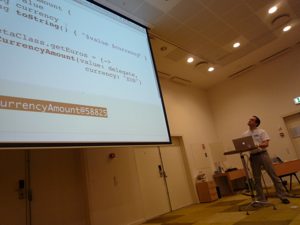
In the second session Dierk König presented 7 usage patterns for Groovy in Java projects.
P1020742_.jpg
This was an interesting and very cunningly presented session.
The seven patterns had quite expressive names: Super Glue, Liquid Heart, Keyhole Surgery, Smart Configuration, Unlimited Openness, House-Elf Scripts and Prototype.
Two more patterns were announced: Lipstick and Ghost Writer.
When asked about Groovy anti-patterns, his response was: overuse of the each()-method on lists, overuse os mocks and overuse of DSLs.

In the third session Guillaume Laforge presented the novelties of Groovy 1.6. The content of the session was roughly the same as in the matching InfoQ article.
In my opinion the AST transformations / compile-time metaprogramming capabilities are the most ground-breaking new feature, which has a huge potential for upcoming innovation.

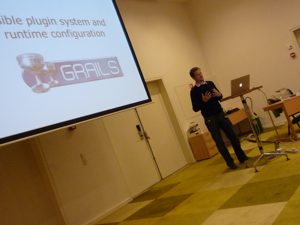
In the fourth session Graeme Rocher presented the novelties of Grails 1.1.
P1020745_.jpg

The main focus of this release were better integration of Grails into the Java ecosystem (e.g. Maven or Ant) and improvements in the Grails plugin system.

The fifth session was a presentation of Guillaume Laforge about domain specific languages in general and the specific language features that enable the realization of internal DSLs in Groovy.
P1020749_.jpg

After that Andrew Eisenberg gave a short demonstration of the upcoming Groovy plugin for Eclipse that is currently developed at SpringSource.

The first day then was concluded with a dinner in Copenhagen's Tivoli.

Day two started with two fast paced sessions by Graeme Rocher. Graeme once said on Twitter "some Java confs are like funerals" ... he proved the contrary in those two sessions. They were jaw-dropping and woke the impression that Grails is really the holy grail of web development ;-)

The first session was called "Building Twitter with Grails". It was basically the same content as Graeme's Webinar.
Even after having attended the Webinar, it was still very inspiring to see Graeme live. It's just very impressive to witness the creation of quite a sophisticated web application (including security, full-text search, caching, asynchronous communication over JMS and RSS support) in under one hour.
A particularly funny episode during the presentation was when Graeme's attachable microphone went dead. As a temporary replacement he was given a handheld microphone, but since this was a real-time coding session, he needed both his hands ... Dierk König jumped in to stand behind him and hold the micro ... this shed a whole new light on pair programming ;-)

P1020752_.jpg

The second session was about the Grails plugin system. This session was equally astonishing as the first one. In another live coding session Graeme developed a plugin and demonstrated that Grails plugin development is not only something for infrastructure gurus but a useful way to modularize a Grails application.
On the same time he used the iwebkit plugin to demonstrate how easy it is to develop an iPhone interface for the twitter-clone from his previous session. This was extremely impressive and provoked the urge to try it out yourself...

The next session was by Jim Shingler about Griffon. This session had a hard stand after Graeme's incredible performance. Also the Griffon project seems still very much in the beginning, so there were a lot of questions and several discussions in the audience.
Unfortunately Jim ran out of time, and could not really finish his main goal: A rich client for the twitter-clone built in Graeme's previous session.

The last session of the conference was by Paul King about "Industrial strength Groovy". This was a very valuable talk, since it was obvious that Paul had a lot of experience from real-world Groovy projects. He talked a lot about best practices for Groovy and the similarities and differences between Groovy and plain Java projects. His slides can be found on slideshare.

P1020757_.jpg

Day two was wrapped up with a panel discussion with all the speakers of the conference.
P1020759_.jpg

One common undertone in the discussion was, that Grovvy and Grails are currently transcending from the early adoption phase into becoming a mainstream technology. This was underlined by the acquision of G2One by SpringSource and by the statement of Dierk König, that Groovy expertise has lately become a selling argument for Canoo.


Monday, April 13, 2009

Google App Engine: Guestbook with Groovy Groovlets

google-app-engine-groovy.png The web is soaring, since Google announced Java support on Google App Engine!
People are getting ahead of themselves to try out their favorite piece of the Java ecosystem on the Google platform.

I figured that I also wanted to experience this pre-alpha-geek feeling :-)

I followed the guidelines to run Groovy appliccations on Google App Engine from glaforge and reimplemented the guestbook example from the Google Appengine SDK with Groovy Groovlets.

The result is here. Leave me a message ;-)


The backend classes (Greeting.java, PMF.java) were not changed (however it seems to be possible to datanucleusenhance classes written in Groovy and compiled with groovyc, see here).

I kicked out the two servlets and the jsp and replaced them with the following two Groovlets.

hello.goovy
import com.google.appengine.api.users.User
import com.google.appengine.api.users.UserService
import com.google.appengine.api.users.UserServiceFactory
import javax.jdo.PersistenceManager
import guestbook.PMF
import guestbook.Greeting

UserService userService = UserServiceFactory.getUserService()
User u = userService.getCurrentUser()

PersistenceManager pm = PMF.get().getPersistenceManager()
String query = "select from " + Greeting.class.getName() + " order by date desc range 0,25"
List<Greeting> greetings = (List<Greeting>) pm.newQuery(query).execute()

html.html {
 head {
  title "Hello"
  link(type:"text/css", rel:"stylesheet", href:"/stylesheets/main.css")
 }
 body {
  div(class: "main"){
   div ("Today is: ${new Date()}")

   if (u == null) {
    div(class:"login"){
     a (href: userService.createLoginURL(request.getRequestURI()) , "Log in with your Google Account.")
    }
   }
   else {
    div(class:"login"){
     span("Welcome ${u.nickname}. ")
     a (href: userService.createLogoutURL(request.getRequestURI()) , "Log out")
    }
   }

   p ("Leave me a message:")  

   form(method: "POST", action: "/post.groovy"){
    div(){
     textarea(name: "content", rows: "3", cols: "60", "")
    }
    div(){
     input(type: "submit", value: "Post")
    }
   }

   greetings.each{
    def user = "anonymous"
    if(it.author != null) user = it.author
    div(class:"entry-header", "On  ${it.date} ${user} wrote: ")
    div(class:"entry-body", "${it.content}")
   }
  }
 }
}

post.groovy:
import com.google.appengine.api.users.User
import com.google.appengine.api.users.UserService
import com.google.appengine.api.users.UserServiceFactory
import javax.jdo.PersistenceManager
import guestbook.PMF
import guestbook.Greeting

UserService userService = UserServiceFactory.getUserService()
User user = userService.getCurrentUser()
String content = request.getParameter("content")
Date date = new Date()
Greeting greeting = new Greeting(user, content, date)

PersistenceManager pm = PMF.get().getPersistenceManager()
try {
    pm.makePersistent(greeting)
} finally {
    pm.close()
}

response.sendRedirect("/hello.groovy")

This was my first take at Groovlets, so it might well be that things are not state of the art...

Groovlet quick tip: textarea()

Using textarea with Markup Builder in a Groovlet can be tricky.

My initial attempt was:
div()
{
	textarea(name: "content", rows: "3", cols: "60")
}

This however results in invalid html:
<div>
    <textarea name='content' rows='3' cols='60' />
</div>


The correct way is to include an empty string (content of the textarea) in the constructor:
div()
{
	textarea(name: "content", rows: "3", cols: "60", "")
}

Which yields correct html:
<div>
    <textarea name='content' rows='3' cols='60'></textarea>
</div>

I hope this helps, since Groovlet documentation is quite sparse.

Saturday, April 11, 2009

Quick Look for Groovy with Syntax Highlighting

In my previous post OS X: Quick Look for Groovy I showed how to enable Quick Look for Groovy source files.
The result was very cool, but syntax highlighting was missing.

After playing around a bit I found out how to enable syntax highlighting for Groovy in Quick Look.

Here is how it works:
  • Install the qlcolorcode-plugin.
    Unfortunately the plugin does not support Groovy out of the box, but we will change that. After installing the plugin you should have the package QLColorCode.qlgenerator in your ~/Library/QuickLook.

  • Go into the QLColorCode.qlgenerator package. Either by right-clicking in Finder and choosing "Show Package Contents" or by navigating into the directory in a shell.

  • Inside the QLColorCode.qlgenerator package edit the script Resources/colorize.sh.

    Extend the case-statement in the middle of the script the following way:
    ...
    case $target in
        *.graffle )
            # some omnigraffle files are XML and get passed to us.  Ignore them.
            exit 1
            ;;
        *.plist )
            lang=xml
            reader=(/usr/bin/plutil -convert xml1 -o - $target)
            ;;
        *.h )
            if grep -q "@interface" $target &> /dev/null; then
                lang=objc
            else
                lang=h
            fi
            ;;
        *.m )
            # look for a matlab-style comment in the first 10 lines, otherwise
            # assume objective-c.  If you never use matlab or never use objc,
            # you might want to hardwire this one way or the other
            if head -n 10 $target | grep -q "^ *%" &> /dev/null; then
                lang=m
            else
                lang=objc
            fi
            ;;
        *.groovy )
        	lang=java
            ;;
        * ) 
            lang=${target##*.}
        ;;
    esac
    ...
    

    This tells Highlight to treat Groovy files as Java source code.

  • Next edit Info.plist inside the QLColorCode.qlgenerator package.
    Add the follwing snippet at the end of Info.plist (just before the ending </array> </dict> </plist>)
    	
    		UTTypeConformsTo
    		
    			public.source-code
    		
    		UTTypeDescription
    		Groovy Source Code
    		UTTypeIdentifier
    		org.codehaus.groovy-source
    		UTTypeTagSpecification
    		
    			public.filename-extension
    			
    				groovy


  • Now you need to nudge the system to tell it something has changed. Moving the whole plugin (QLColorCode.qlgenerator) to the desktop then back to its installed location should do the trick.

  • This should be it! The result is Quick Look for Groovy with syntax highlighting:

    Picture 2.png


    The syntax highlighting is still not perfect, since it is Java highlighting... but it is much better than no highlighting.

    Monday, March 23, 2009

    Groovy Grape: Problem resolving xalan

    There is a problem in Groovy Grape: It fails resolving xalan 2.7.1.

    The following grape declaration for instance leads to the error:
    @Grab(group='net.sourceforge.htmlunit', module='htmlunit', version='[2.4,)')
    

    The reason is, that htmlunit has a dependency to xalan, and xalan cannot be resolved...

    The problem can also be reproduced on the commandline: grape resolve xalan xalan 2.7.1
    The following error is printed on the console:

    [FAILED ] xalan#xalan;2.7.1!xalan.jar: invalid sha1: expected=sha1(xalan-2.7.1.jar)= computed=75f1d83ce27bab5f29fff034fc74aa9f7266f22a (9927ms)

    The underlying reason is the follwing bug in Ivy 2.0: IVY-1006.

    The bug is supposed to be fixed in Ivy 2.1, but Groovy 1.6 bundles Ivy 2.0.

    Meanwile a workaround is to manually download serializer-2.7.1.jar and xalan-2.7.1.jar from the maven repository and copy it at the place where grape would put it: ~/.groovy/grapes/xalan/serializer/jars/ respective ~/.groovy/grapes/xalan/xalan/jars/ on OS X.

    Monday, March 9, 2009

    Maven inside: say hello to Groovy Grape!

    intel-inside.png Actually the title should be 'Ivy inside' - but the coolest thing about Maven is its dependency management... the part that Apache Ivy provides.

    Groovy 1.6 has a very cool new feature: Grape - The Groovy Adaptable Packaging Engine

    Example:
    import org.mortbay.jetty.Server
    import org.mortbay.jetty.servlet.*
    import groovy.servlet.*
    
    
    @Grab(group = 'org.mortbay.jetty', module = 'jetty-embedded', version = '6.1.0')
    def runServer(duration) {
        def server = new Server(8080)
        def context = new Context(server, "/", Context.SESSIONS);
        context.resourceBase = "."
        context.addServlet(TemplateServlet, "*.gsp")
        server.start()
        sleep duration
        server.stop()
    }
    
    runServer(10000)
    

    The @Grab annotation will resolve and download the embeddable jetty servlet container and all its dependencies ... just as we are used to by good old Maven, just without all the pom-hassle!

    Place a simple hello.gsp in the same directory, and access it at http://localhost:8080/hello.gsp ...

    Very cool, isn't it?

    On second thought though we should not overestimate the feature. For one thing it exposes the known weaknesses of Maven (accessibility to needed repositories, availability of all dependencies ...).

    On top of that it shifts these problems from build-time (Maven) to run-time (Grape). This can be problemetic since resolving and downloading dependencies can be quite an overhead, that is not always desirable at runtime. And the fact that Grape is not giving any feedback, what is going on (at least not per default) does not improve the situation ...

    Considering this, I think Grape is a cool feature for developing and exchanging simple apps/scripts and for prototyping ... but I would not consider it for a productive app.

    Friday, March 6, 2009

    OS X: Quick Look for Groovy

    Update: The info in this post is deprecated, check out my post Quick Look for Groovy with Syntax Highlighting.


    Quick Look is one of the coolest features of OS X Leopard.

    Unfortunately it only supports a limited range of file types.
    I blogged before how I got Quick Look to display .properties files.

    Lately I am playing a lot with Groovy... and .groovy files are also not supported by Quick Look out of the box.

    Finally I got Quick Look working to show .groovy files. But it has been quite a hassle.

    In the following I am using TextMate, but this should also work with another text-editor like Smultron or TextEdit.

    This is what I did:
  • I navigated into the TextMate package (right-click->Show Package Contents).
  • I edited Contents/Info.plist with a text-editor.
  • I added the follwing snippet at the end of Info.plist (just before the ending </dict> </plist>)
  • 	
    	UTExportedTypeDeclarations
      
        
          UTTypeConformsTo
          
            public.text
    			public.plain-text
          
          UTTypeDescription
          Code
          UTTypeIdentifier
          com.macromates.textmate
          UTTypeTagSpecification
          
            com.apple.ostype
            TEXT
            public.filename-extension
            
              properties
              groovy


  • Then I set TextMate as the default editor for .groovy files.

  • Then I did the following steps on the command-line, without really knowing what they do. Probably not all of them are necessary:
  • touch /Applications/TextMate.app
  • qlmanage -r
  • touch ~/Library/QuickLook/QLColorCode.qlmanager
  • /System/Library/Frameworks/CoreServices.framework/Versions/A/Frameworks/LaunchServices.framework/Versions/A/Support/lsregister -f -v ~/Library/QuickLook/QLColorCode.qlmanager

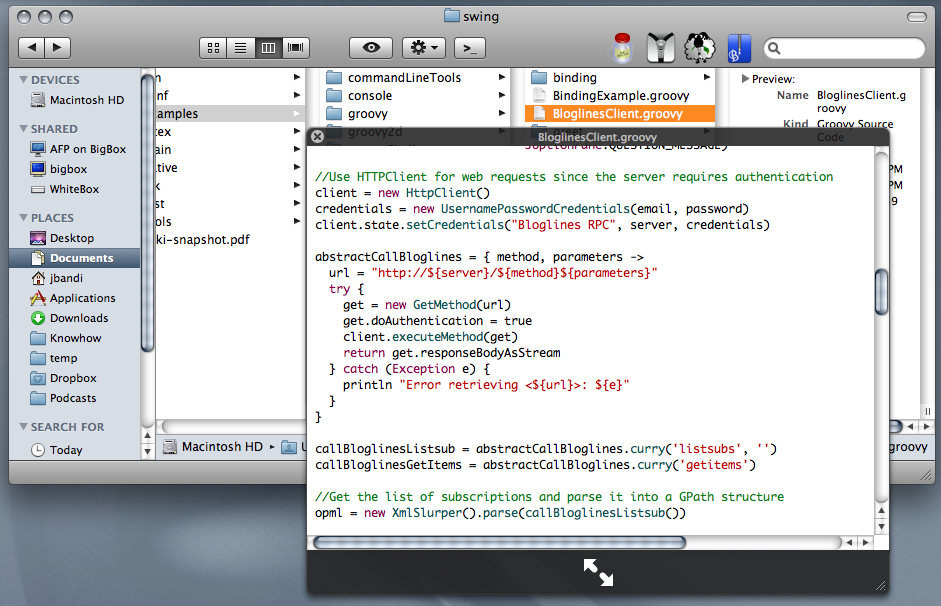
  • The result is that QuickLook at least displays .groovy files as plain text:
    Picture 1.png
    Next on the wishlist would be syntax-highlighting. Unfortunately this does not work with the qlcolorcode-plugin since Highlight does not support Groovy.

    Last tip: To find out which Quick Look generator is configured for a file type you can use the following command: qlmanage -p Greet.groovy 2>&1 | grep 'Generator used'

    I collected these infos mainly from here and here.

    Wednesday, February 25, 2009

    Web automation with Groovy and Ruby

    For a small private project I need to do some web automation.

    I wanted to use a scripting language and decided to give Ruby and Groovy a try.

    In Ruby there is the Mechanize library. In Groovy there are different options.

    The Ruby Mechanize library seems very intuitive:
      require 'rubygems'
      require 'mechanize'
    
      a = WWW::Mechanize.new { |agent|
        agent.user_agent_alias = 'Mac Safari'
      }
    
      a.get('http://google.com/') do |page|
        search_result = page.form_with(:name => 'f') do |search|
          search.q = 'Hello world'
        end.submit
    
        search_result.links.each do |link|
          puts link.text
        end
      end


    I like the DSLish way to both, scrape (eg: earch_result.links.each) and manipulate (eg: search.q = 'Hello world') a web page.

    In Groovy scraping is also pretty DSLish:
    def page = new XmlSlurper(new org.cyberneko.html.parsers.SAXParser()).parse('http://groovy.codehaus.org/')
    def data = page.depthFirst().grep{ it.name() == 'A' && it.@href.toString().endsWith('.html') }.'@href'
    data.each { println it }
    
    But it makes a bit a less concise impression than the Ruby version.

    Manipulating a web page with groovy unfortunately is clumsier:
    import com.gargoylesoftware.htmlunit.WebClient
    
    def webClient = new WebClient()
    def page = webClient.getPage('http://www.google.com')
    // check page title
    assert 'Google' == page.titleText
    // fill in form and submit it
    def form = page.getFormByName('f')
    def field = form.getInputByName('q')
    field.setValueAttribute('Groovy')
    def button = form.getInputByName('btnG')
    def result = button.click()
    // check groovy home page appears in list (assumes it's on page 1)
    assert result.anchors.any{ a -> a.hrefAttribute == 'http://groovy.codehaus.org/' }
    
    
    This is less DSLish and much more old-scool imperative... the different styles for scraping and manipulating is a bit unfortunate (however you can also use HtmlUnit for scraping).

    Related Posts Plugin for WordPress, Blogger...